The model menu
Last updated 3 February 2010
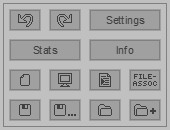
Undo, redo
Undoes or redoes the last action. You can undo up to 20 actions.
Change model settings
Changes the model settings. These settings are saved with the model file. More information about model settings can be found here.
Show model stats
Shows how many objects the model consists of, and how many objects are in the selection.
About Model Creator
Shows information about Model Creator and credits.
New model
Starts a new model.
Preview model
Previews the current model, showing how it will look in Game Maker (with normals and everything).
Generate GML code
Generates the GML code required to load/create the current model.
Change file association settings
Here you can set if you want .gmmod files to be opened with Model Creator automatically or not.
Save current model
Saves the model.
Save current model in a different file
Saves the model using a different filename (aka 'save as').
Load a model file
Loads another model from a file.
Import another model
Loads another model from a file and adds it to the current model ('paste from').
Comments
This page used to have a comment section. It's closed now; what remains are the questions I answered.
Dave21 · 22 March 2020, 00:25
hello, I'm not able to open models or save in this program, errors always appear like: "Failed to create the file" or "Failed to open the file. Make sure you have read access to the folder". What I do?
Luc · 22 March 2020, 16:49
Hi Maarten,
Just want to thank you! I'm a Flemish person, living in Brazil. I have a language school here. Here the Covid 19 crisis is starting and schools are closed. We give classes online now. I've downloaded simplescreenrecorder to record my classes, so I can share them with students who weren't able to follow the class. Works perfectlyi! Thanks again!
Maarten Baert author · 23 March 2020, 12:49
Try going into the properties of the Model Creator executable and run it in Windows 7 compatibility mode.
You're welcome :).