Troubleshooting
Last updated 1 February 2022
The recording is completely black (except for the cursor)
Some Linux distributions (e.g. Ubuntu 17.10) will by default use the Wayland display server. Since Wayland doesn't provide a standardized API for screen capturing, SSR can't support it (yet). The solution is to switch back to the X11 display server. On Ubuntu, this can be done by logging out, clicking the 'gear' icon on the login screen and selecting 'Ubuntu on Xorg', and logging back in. This is explained in more detail here.
The recording occasionally flickers, showing parts of the desktop background instead of windows
This is a known problem with some window managers, especially those based on Mutter (the GNOME 3 window manager) and Cinnamon, though other compositing window managers (e.g. Compiz) can also be affected by this. Since this is a window manager flaw, other recording software is affected by this too. For Intel GPUs, the flickering can sometimes be eliminated by doing one of the following:
- Changing the acceleration method from SNA to UXA as described in this article or this video tutorial.
- Uninstalling the driver for 2D acceleration (
xserver-xorg-video-intel,xf86-video-intelor similar).
If that doesn't help, then the only solution is to switch to a different window manager, or use OpenGL recording.
Some codecs (e.g. H.264) are 'not installed'
Some distributions will omit codecs that have patent issues, but allow you to install them as a separate package. For Ubuntu, this can be done by running: sudo apt-get install libavcodec-extra-53 libavformat-extra-53.
"Can't open output file" error
This error indicates that the output file could not be created. Common causes are:
- The output directory does not exist (i.e. you entered an incorrect path).
- You don't have permission to write to the output directory.
- Your hard disk is full.
"Can't write header" error
This error indicates that ffmpeg/libav (the underlying video and audio encoding library) failed to initialize the output file. Common causes are:
- You have selected a codec that is not supported by the container (for example, you tried to use the VP8 video codec with the MP4 container).
- Your hard disk is full.
Recording appears to work, but the resulting file has a length of zero
The most common cause is a problem with your audio settings. Try recording without audio to see whether this is the case. If this solves the problem, it usually means that some other application is blocking access to the audio source, preventing SimpleScreenRecorder from recording it. This can happen when either SimpleScreenRecorder or another application is configured to open the audio source in exclusive mode (when using ALSA, this means using hw:x.x sources), or when different applications try to use a different sound system at the same time. For example, when SimpleScreenRecorder is configured to record your microphone using PulseAudio, but another application is trying to record the same microphone using ALSA, then only one application will be able to access the microphone at the same time. Try closing other applications that might be recording audio, or change the audio settings of either SimpleScreenRecorder or the other application such that they don't conflict with each other.
Weird glitches (horizontal lines, missing objects) when using the NVIDIA proprietary drivers
Here's a screenshot of the bug appearing in Minecraft: link. Luckily there is a simple fix. Go to the NVIDIA driver settings and disable 'allow flipping'. I've only seen this issue happen with the proprietary NVIDIA driver, but it may also apply to other drivers/vendors. Alternatively, switch to OpenGL recording.
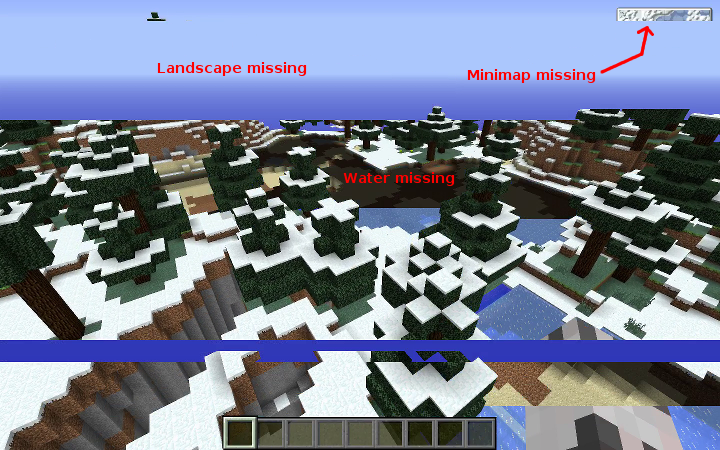
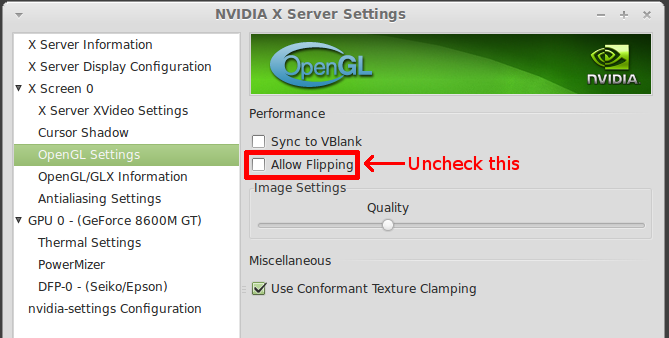
This issue will only appear when you use an OpenGL based compositing window manager (Compiz, Mutter, KWin with effects enabled, ...) or when you run a fullscreen OpenGL application and you try to record it without OpenGL recording.
I'm pretty sure the cause is a race condition inside the X server, where the server tries to take a screenshot of the screen while at the same time the NVIDIA driver flips the front and back buffer. The result is a screenshot of the back buffer (which is in the process of being redrawn) rather than the front buffer.
OpenGL recording doesn't work: the application size is not recognized
If your application is 32-bit (e.g. Steam, most Windows games running through WINE), and you have a 64-bit system, make sure you have installed the 32-bit SimpleScreenRecorder libraries. More information can be found here.
If this doesn't solve the problem, you may need to do something special to get the right environment variables to the program that you want to record. For example, Steam games need some special settings. Try running the program from a terminal, and look for lines like this:
[SSR-GLInject] Library loaded (64-bit).
[SSR-GLInject] [GLXFrameGrabber 1] Created GLX frame grabber.
[SSR-GLInject] [/dev/shm/ssr-channel-maarten/video-18793506676-12090-glx0001-glxgears] Created video stream.
[SSR-GLInject] OpenGL version = 4.4 (4.4.0 NVIDIA 343.36).
[SSR-GLInject] [/dev/shm/ssr-channel-maarten/video-18793506676-12090-glx0001-glxgears] frame size = 300x300.
If you don't see any lines starting with [SSR-GLInject], the library is not loaded, which means the program didn't get the right environment variables. If the program is started through a wrapper script, you should try to run the actual program directly, without the wrapper script.
If you do see lines starting with [SSR-GLInject], but not the one with GLXFrameGrabber in it, the application is probably not an OpenGL program.
If you do see lines starting with [SSR-GLInject], including the one with GLXFrameGrabber, but it still doesn't work, please send me a bug report. OpenGL recording is experimental, so it is possible that it doesn't work yet for all programs.
Slowed-down, out-of-sync audio when recording the speakers with PulseAudio
When this happens, you will usually get the following error message:
Warning: Audio input is more than 5% too fast, video and audio will be out of sync.
The cause is a bug in PulseAudio. The issue has been fixed and the fix should arrive in some future version (probably 4.1). For now, you can work around the bug by modifying the file /etc/pulse/daemon.conf and adding/modifying these lines:
default-sample-rate = 48000
alternate-sample-rate = 48000
After doing this, you should restart PulseAudio (or just reboot). These values will force PulseAudio to use the same sample rate at all times rather than switching between 44100 Hz and 48000 Hz (which will trigger the bug).
Some users have reported that sound recorded through PulseAudio is still buggy even after applying this workaround, so it appears that there is more than one bug in PulseAudio that can cause this issue. I haven't been able to reproduce this myself though. If you are unable to fix the problems with PulseAudio, consider using JACK instead.
No sound when recording the speakers with PulseAudio
If no sound is recorded, make sure the monitor channel is not muted. To do this, go to the "Input devices" tab in PulseAudio Volume Control, select "Show: All input devices" and make sure the "Mute audio" button of the monitor channel is not enabled. (credit goes to 'scrawl' for figuring this out)
Repairing partially saved MP4 files
If you choose MP4 as the container format, and the recording is interrupted for any reason (e.g. you run out of disk space, or your computer crashes, ...) then the resulting file will most likely be unreadable. This is a known problem with MP4, and can be avoided by using the MKV container format instead.
In some cases it is possible to repair the broken file with the untrunc tool. Note that even if it works, you may find that the file has issues, e.g. video and audio may be out of sync. The tool has some options to try to correct this.
Still, the best way to avoid this problem is to use MKV instead, then the repair process is much easier and more reliable.
Comments
This page used to have a comment section. It's closed now; what remains are the questions I answered. For questions and bug reports, please use GitHub.
Fabblow · 16 October 2013, 16:00
Hi!! First of all, sorry for my English. SCR is the only program that makes everything I need but I found a problem with sound. About the minute 17 it begans to sound like a mobile under earth. I use Ubuntu 13.04 and I record Minecraft with sound and mic. ¿Do you know anything about?
Thanks!!
Maarten Baert author · 18 October 2013, 18:55
You're not the first one, there's a bug report that's surprisingly similar:
https://github.com/MaartenBaert/ssr/issues/32
Unless that was also you of course :).
I think it's a problem with PulseAudio. If that's the case, you should be able to use JACK instead in the next version, and that should fix the issue.
Just in case it isn't PulseAudio, could you tell me what codecs you were using, and send me the log file? You can find it at
~/.ssr.Ubuntuaddicted · 20 November 2013, 01:05
i just went to check my /etc/pulse/daemon.conf and sure enough the default-sample-rate was at 96000 so I changed it to 44100 but I also added the alternate-sample-rate which I thought I was suppose to but when I restart pulse, I recieve this error
E: [pulseaudio] conf-parser.c: [/etc/pulse/daemon.conf:79] Unknown lvalue 'alternate-sample-rate' in section 'n/a'.
Just an FYI, I commented it out and pulse starts back up just fine. Is there any reason we don't set pulse to 48000, I have read that's what streaming input should be set to because its devisible evenly, does this have any merit?
Maarten Baert author · 22 November 2013, 21:23
SSR is currently hard-coded to 44100 (meaning there is no way to change it from the GUI right now), and there is a bug that only gets triggered when a different application plays at the alternate sample rate. By setting both to the same rate, that bug is gone. But it looks like your version of PulseAudio doesn't even have that option, so that can't be it.
I think this is an unrelated bug. But I have never seen it myself, so it's hard to tell.
Anyway, JACK support is almost done, and it should be more reliable that adding null sinks and loopbacks to PulseAudio. After this I want to add multiple audio inputs and mixing to SSR so that should also work around this bug (I hope).
Ubuntuaddicted · 22 November 2013, 22:43
since ssr is going to record at 44100 no matter what, i should NOT set pulse default to 48000 then correct? Just curious why i've read that 48000 is the preferred sample rate for streaming and if you have heard that?
Everything is actually working perfectly right now. I couldn't be happier with my streaming to twitch using ssr, i had 6 viewers last night. I was playing in a 1280x720 windowed mode game. (not opengl since i didn't have to enable it) I spent hours upon hours trying to get a bash script of ffmpeg or avconv to work right and no matter what it wasn't sync'ing the audio streams with the video.
Thank you!!!!
Maarten Baert author · 23 November 2013, 00:30
I don't know. Some people seem to prefer 48000, others 44100. It really doesn't matter as long as you avoid unnecessary conversions, so for the best audio quality you should indeed set PulseAudio to 44100 as well.
This is a problem inherent to ffmpeg, it doesn't have a good system to deal with synchronization issues AFAIK. It just assumes that if you start the video and audio at roughly the same, it will stay in sync, but that's often not true. It also assumes that the video frame rate stays constant throughout the entire video, which is also not true. Those are the things I had to do myself to make it work properly :).
Ubuntuaddicted · 6 December 2013, 02:51
Very strange. Running kernel 3.7.0-030700-generic and your software works to record the steam demo game called "Life Goes On" BUT with 3.10.1-031001-generic installed from an ubuntu saucy ppa, I can't record "Life Goes On" with your software, the file size acts like it captured video/audio (there's even video/audio in the preview window BUT when I click on the file parole and vlc says there is no stream in the video file. If I view the mediainfo on the file it shows
How does the kernel affect screen capturing? I tried kazam as well and that doesn't work either, in fact trying to create a window to record in kazam i don't get any graphics on screen when I start the box, its just a greyed out desktop.
Any thoughts? I installed 3.10 because I want to try out bcache with my OCZ Synapse Caching SSD
Maarten Baert author · 7 December 2013, 15:41
I've used it with 3.7, 3.8, 3.10, 3.11 and now 3.12, and never seen an issue like that. Are you sure that the kernel is really the only thing that changed? It seems very unlikely that a kernel would break something like this, unless there's already some other subtle bug in the code that wasn't noticed earlier.
The fact that the preview still works suggests that the problem is in the ffmpeg/libav libraries and not SSR itself. It could also be a bug in VLC, so maybe you should try it with mplayer or ffplay/avplay as well (but it's unlikely, the file should never be that small). You can also try a few different formats in SSR (e.g. H.264+Vorbis in MKV).
Try to encode something with the ffmpeg/avconv command-line tool, like this:
Now try to open that file in VLC. Does it play?
Cjcwj12 · 26 December 2013, 02:03
PLS HELP!!!!!
this is the best screen recorder I have come across but I re-installed my os (Elementary OS) and now when I install skype and then install ssr it deletes skype, when I re-install skype it deletes ssr. So I can't install both PLS HOW DO I FIX IT!!!!!!!!!!!!!!!!!!!!!!!!!!!!!1
Maarten Baert author · 26 December 2013, 15:37
Calm down ;)
Sounds like a dependency problem with the skype or SSR package. Try to install SSR from a terminal, and then install skype from a terminal, then copy the output of both commands and send it to me.
Cjcwj12 · 30 December 2013, 02:55
They used to work together until I did a dist upgrade.
Im using Elementary OS and installing skype 4.2 via terminal and ppa
When I install it from software centre it still says SSR will be removed aswell as the lib stuffs
Maarten Baert author · 30 December 2013, 18:30
The issue is not SSR but Qt4. Skype uses 32-bit Qt and SSR uses the 'right' Qt for your system (i.e. 64-bit if you have a 64-bit system). Apparently you can't install the 32-bit and 64-bit qt libraries at the same time. I suppose you also can't install VLC and Skype at the same time then. This is a packaging bug, you should report it to the maintainers.
This is probably the same issue:
http://elementaryforum.org/forum/support-assistance/support-assistance/5369-elementary-os-luna-64-bit-skype
You could try that workaround, or you could just wait a few days, it's possible that they will have fixed it by then.
Cobra · 5 January 2014, 09:30
Just wanted to add, for those who are having issues recording through their internal mics, if you have both pulse audio and gnome alsa mixer installed, switch from pulse to the alsa mixer under audio input, and make sure mic is not muted under both alsa and pulse.
Maarten Baert author · 5 January 2014, 21:10
If you are referring to the SSR setting on the input page, that's not recommended. If you set SSR to ALSA while you have PulseAudio installed, SSR will be forced to use ALSA emulation for PulseAudio and that usually only makes things worse.
My advice is to check all settings in PulseAudio Volume Control first, and if that doesn't help, use the command-line program 'alsamixer'. These two programs give you the most extensive control over PulseAudio and ALSA respectively.
Chaostiger · 26 January 2014, 16:37
Yes, I posted on the opengl page too. I am always using scaling to 1280x720. It always happens when I try to stream with openGL recording. With normal screen capture, sometimes it works fine, the game is fullscreen, and sometimes not. I can't play in Windowed because scrolling with the mouse in Dota 2 windowed doesn't work. When my issue occurs, Dota 2 is in a small box on the stream, with the rest(about 3/4 of the screen) being taken up by my normal desktop, as if Dota was in a minimized window that was resized to 640x480. Thanks for the idea.
Edit: It may have to do with the way I have to alt-tab. I can't alt-tab normally because of a WM bug(Cinnamon), so switch to workspace 2 and back to one, by doing Control-Alt Right and then Control-Alt-Left.
Edit 2: This also happens with an avonv script. The stream could also be frozen on a random frame of the game, fullscreen, with the mouse moving. Borderless Windowed works but I can't play right due to the afformentioned issue. Might not be an SSR issue.
Maarten Baert author · 26 January 2014, 21:39
SSR simply asks X11 for the size of the window, and it uses that resolution to record the game. It sounds like the game itself is doing something wrong, maybe it doesn't understand how you're supposed to make applications fullscreen on Linux.
I don't really understand your description. Can you upload a short video so I can see the issue, and describe what you actually see on the screen when this happens?
Ubuntuaddicted · 27 January 2014, 20:11
it takes extra CPU to use the scaler to the best of my knowledge.
Since I only have bandwidth for 720p@30FPS I play all my games in 1280x720 and stream without the scaler. Maybe you could try another DE that doesn't contain the mouse scrolling bug that cinnamon has. I use Xubuntu but i haven't tried DOTA2 yet so I am not sure this mouse scrolling bug exists in XFCE or not.
Chaostiger · 27 January 2014, 20:18
Apparently that's a Dota 2 bug, not a DWM issue.
Maarten Baert author · 29 January 2014, 04:05
I understand now, you are not using 'OpenGL recording', you are using X11 recording to record a fullscreen OpenGL game, and that sometimes doesn't work. Actual OpenGL recording may work better in this case. Have you tried it?
You can also try to disable 'fullscreen unredirection' in your window manager (the name may be different, e.g. XFCE calls it 'display fullscreen overlay windows directly').
This is less of a problem with the new scaler. The packages in the repository still use the old scaler, but if you compiled from source, you have the new one (which is literally 10 times faster).
Chaostiger · 29 January 2014, 05:31
Thanks again for replying Maarten. I have tried using openGL, but I'm having a similar odd issue here.If I am tabbed-into Dota 2, SSR reports the resolution as 1920x1080, which is correct. If I'm tabbed-out, looking at the SSR window, the resolution input number drops to 640x480. If I try starting the stream and then alt-tabbing into Dota 2, the stream is 640x480. I know it reports as 1920x1080 because if I alt tab quickly to SSR, I see Size In change from 1920x1080 to 640x480. Disabling fullscreen undirection didn't work. Thanks again.
Maarten Baert author · 29 January 2014, 05:53
I can only conclude that the game is doing something weird. Maybe it's opening two windows at the same time?
You could try to compile from the glinject-next branch, the OpenGL recording code in that branch can handle a lot more (including multiple windows, if that's the cause).
Chaostiger · 29 January 2014, 06:07
I actually fixed it. Using openGL recording, I told SSR to scale to my native Dota 2 res, 1920x1080. I then started SSR streaming before I started dota 2. Now, when I am tabbed-into Dota 2 playing, it is being streamed at 1920x1080 and looks great. If I tab out, it drops to 640x480, but I can totally deal with that. Thanks Marteen. It's likely Valve dropping the ball, but this solution works.
Maarten Baert author · 1 February 2014, 00:49
Nice to hear that. What did you change? Did switching to glinject-next fix it?
Rightwingrb · 9 March 2014, 17:09
I am having an issue trying to record game audio (or any "system" audio) and a mic input simultaneously. My son does let's play vidoes for YouTube and needs to capture the game audio and his voice. He is using Mint 16 and we have tried all of the different audio setting in SSR. Jack does not work at all and Pulse or ALSA will only record one or the other (mic or sys audio). Any ideas what we may be doing wrong?
Maarten Baert author · 10 March 2014, 23:31
You should read this article, it's all explained there. I have plans to make this easier in future versions of SSR, but for now this is the only way to record multiple sources at the same time.
Freebooter · 10 May 2014, 01:42
Running into a problem with the quality of the recording i make. This doesn't appear to be a problem with your software, it seems prevalent on every recording software, even printing a screen pic. When i do these things, the colors are dulled (washed out) and look flat compared to what i'm actually seeing on my desktop. Any insight into the problem would be awesome. Thanks!
Maarten Baert author · 10 May 2014, 17:24
All popular video formats use the YUV color space instead of RGB. SSR converts RGB to YUV420 (the most popular format) and your video player converts it back to RGB. YUV420 stores color information at half resolution, so some things (e.g. colored text) get smeared out a bit. Sadly there's no way to avoid that, it's a limitation of those video formats.
What you're seeing could also be a color profile issue. SSR has no support for color profiles, it just takes raw RGB and converts it to YUV, and the video player does the same in reverse. However, it's possible that your video player is doing an additional conversion to your color space, which would change the colors. In that case you should try a different video player (or play the same video on a different computer) to see whether that makes any difference.
Ubuntuaddicted · 11 May 2014, 05:28
i know this won't assist in livestreaming but i do believe you can apply color correction within a video editor like kdenive. http://opensource.com/life/11/11/kdenlive-part-4-colour-correction
Maarten Baert author · 12 May 2014, 03:36
That won't work, it's not a color space problem but a compression problem. There is literally no way to store colored text at full resolution in any of the popular video formats.
Mitchness · 23 June 2014, 15:38
My issue is a green video. It doesn't matter the format or video player I use. It still shows up green. The only thing I can do to view it is use avidemux. I tried saving it from there to various formats and still get a green screen. Audio works.
Maarten Baert author · 24 June 2014, 09:24
Which codec are you using? Can you send me an example file that I can analyze (not on YouTube, I need the file itself)?
Joltthehedgehog · 24 July 2014, 01:35
Whenever I try starting a recording, I get this message:
[PageRecord::PageStart] Starting page...
[PageRecord::PageStart] Started page.
[PageRecord::RecordStart] Starting recording...
[Muxer::Init] Using format mp4 (MP4 format).
[BaseEncoder::CreateCodec] Error: Can't find codec!
[PageRecord::RecordStart] Error: Something went wrong during initialization.
Any help? I have no idea what it means by that.
Maarten Baert author · 30 July 2014, 13:44
I assume you're trying to use H.264. Read this.
Rightwingrb · 22 October 2014, 23:05
I am currently using OpenSuse 13.1 and SSR. When I click record (or hit Ctl-R) SSR will start to record for less than a second and then crash. A file is saved as the selected type (.mp4, .mkv, etc) but never larger than about 50-60kb. Any suggestions?
Maarten Baert author · 25 October 2014, 00:24
Make sure that you are using the latest version of SSR (0.3.1) and that the ffmpeg/libav libraries are up-to-date. If that doesn't fix the problem, please send me the log file (saved in ~/.ssr/logs) and a backtrace of the crash. You can get a backtrace by running:
Toor · 14 November 2014, 09:32
Is there an "automatic-end"-option?
I want to record the entire screen for some time and afterward the computer should get shut down automatically (by "sudo shutdown -h 60").
I get a pretty large file (around 1.3 GB) but it's not possible to play it since it has not been saved/ended correctly.
I think, I would need something like an auto end for ssr or a way to get the file closed correctly even if the program is forced to end.
Maybe there is also a way to complete the saved file afterwards? (Since the data seems to be there).
I'm using Container MP4 and video codec H.264, audi codec Vorbis on Ubuntu 12.04.
Thanks a lot! SSR is really fantastic!
Maarten Baert author · 14 November 2014, 20:14
I'm working on this. For now, the best solution is to use a tool like xmacroplay to simulate key presses, so you can run a script that waits for some time and then stops the recording by pressing the right hotkey.
Toor · 16 November 2014, 00:53
Okay, thanks! This will work.
Do you have a shortkey for "save"? If I relay on mouse clicks, I have to hope that no notification pops up in the taskbar, otherwise the symbol moves and the automatic clicks miss the "save record" button.
Pressing only Record-Hotkey will stop the record but not save the file...
Maarten Baert author · 16 November 2014, 19:07
Use the 'separate file per segment' option. If you enable that, the file is saved as soon as you stop the recording.
Ubuntuaddicted · 24 November 2014, 15:04
If using Pulseaudio you need to create a channel map which maps the audio to both left and right. It's probably because your sound device is a stereo mic. It involves adding a line to a pulseaudio Conf file. Check out the arch wiki for pulseaudio and read the troubleshooting section for the m-audio audio interface. After you add that channel map line and restart pulseaudio you should be good to go.
Mike · 24 February 2015, 02:50
So I am fairly new to this and I would like to know how to record my skype call while doing working with my friends in gaming. Is there a way?
Maarten Baert author · 1 March 2015, 16:17
This functionality exists as a patch but is not available in the official build due to GUI limitations. You may be able to compile it yourself:
https://github.com/MaartenBaert/ssr/pull/74
It's old though and may no longer be compatible with the latest source code - I haven't tried it. I intend to add this functionality once I have created a new GUI which will allow me to add more features without making the program overcomplicated.
Yes, read this.
Sammuel · 7 March 2015, 18:32
Hello, i'm running simple-build-and-install from git repo and it gets stuck saying
tried to google the error and found out it is related to xext libraries, but i have them installed an error still happens
I'm on linux mint 17.1 64bit
Also i'm still not really good at coding and stuff so this may be related to my ignorance
Maarten Baert author · 10 March 2015, 21:19
On Debian/Ubuntu based distributions, you have to create some symlinks in order to compile the 32-bit library. You can find the instructions in the readme file.
Jitsumi · 27 March 2015, 07:59
Hello.
First, I would like to thank you for your software, it's certainly the best solution for recording video games on linux. Thanks a lot!
I wanted to knwo if something change recently (in your software or in opengl?).
I could record minecraft in 1920X1080 at 30 fps wihtout any problem. But recently the ftps drop at 10-12 fps... If i do not record, I am around 70-100 FPS, so I found it's a big difference.
Anyway, again, thanks a lot.
Maarten Baert author · 27 March 2015, 23:50
Are you using an AMD card? It's a known problem:
https://github.com/MaartenBaert/ssr/issues/291
I'm working on a fix.
Jitsumi · 28 March 2015, 05:09
Hello, thanks for your answer.
Nope, I have a nvidia card (geforce GT 750M) with the 331 version driver. (Ubuntu 14.10, i think it's doing the same with ubuntu 14.04).
Also my computer has optimus. I'm suppose to be all the time on the nvidia card, so i don't think it has any impact.
Maarten Baert author · 28 March 2015, 17:24
Optimus has a massive impact. It adds significant additional load to the PCI Express bus, and for some reason the Linux implementation of Optimus (Bumblebee) is using far more bandwidth than necessary. GLInject uses the same bus to capture frames, so now every frame is captured exactly twice. So you should expect to see your frame rate halved when you activate the recording.
10-12 FPS sounds suspiciously low though. It could be the same issue that's affecting AMD cards. We will see once the new protocol is ready.
For now, you may actually get better performance with the Intel GPU, since it avoids the PCI Express bus.
Gerberb · 20 June 2015, 06:02
Suddenly ssr nolonger see's any installed codex. It claims they are not installed. I am using openSUSE 13.2 I have used ssr for a while. This is the first time I am unable to record anything because all codex's are showing as not installed. I have installed every possible codex for openSUSE 13.2. Any idea's on how to get ssr working again?
Maarten Baert author · 28 June 2015, 11:03
SSR uses ffmpeg or libav as an intermediate layer to use those codecs. Just installing the codecs is not enough, you need a version of ffmpeg or libav which was compiled with support for these codecs.
Ubuntuiscool · 10 August 2015, 11:03
My hard drive isn't full, I am going to make a video in a folder I have permission to write in, and the output directory is real! I keep getting the 'Can't open output file' error, and I always use AVI and it works a lot of times. I was going to record robocraft and suddenly got this error '[PageRecord::StartPage] Starting page ...
[PageRecord::StartPage] Started page.
[PageRecord::StartOutput] Starting output ...
[Muxer::Init] Using format avi (AVI (Audio Video Interleaved)).
[Muxer::Init] Error: Can't open output file!
[PageRecord::StartOutput] Error: Something went wrong during initialization.'
I use Ubuntu 14.04 LTS.
Maarten Baert author · 11 August 2015, 21:42
Run SSR from a terminal, you will get more detailed error messages that way. I suspect that you're trying to use a codec which isn't supported by AVI. Is there a specific reason why you want AVI? MKV is usually a better choice.
Hj · 18 August 2015, 21:52
Hello,
I'm having trouble getting audio to record. I'm testing recording a video/audio clip form a site.
Backend set to 'Pulse Audio' and Souce set to 'Monitor of...'
The saved file has no audio.
Please help. Thanks.
Stas · 22 August 2015, 17:44
HI, its cool programm and thank you for your work! With default options it's ok. But when I set custom width and height I see lower quality. Blurred picture. Can I fix this? Ubuntu 14.04. Thank you
Maarten Baert author · 23 August 2015, 23:23
Try installing 'PulseAudio Volume Control' and use it to check that you haven't accidentally muted the source that you are trying to record. You should do this while SSR is running and recording.
Try increasing the bitrate.
Gnussbaum · 18 September 2015, 17:16
Trying to install ssr on Scientific Linux 6.4. When running the simple-build-and-install script I get:
checking pkg-config is at least version 0.9.0... yes
checking for QT4... no
configure: error: Qt4 not found
I have QT4 installed:
rpm -qa | grep qt
qt-mysql-4.6.2-26.el6_4.x86_64
poppler-qt4-0.12.4-3.el6_0.1.x86_64
qt-4.6.2-26.el6_4.x86_64
qt5-qtbase-5.4.1-15.el6.x86_64
qt-devel-4.6.2-26.el6_4.x86_64
PackageKit-qt-0.5.8-21.el6.x86_64
qt3-3.3.8b-30.el6.x86_64
qt-x11-4.6.2-26.el6_4.x86_64
qt-sqlite-4.6.2-26.el6_4.x86_64
qt5-qttools-common-5.4.0-1.el6.noarch
qt-4.6.2-26.el6_4.i686
qt5-qttools-libs-designer-5.4.0-1.el6.x86_64
qt5-qtbase-common-5.4.1-15.el6.noarch
pinentry-qt-0.7.6-6.el6.x86_64
dbus-qt-0.70-7.2.el6.x86_64
qt5-qtbase-gui-5.4.1-15.el6.x86_64
Any ideas how to fix this?
Maarten Baert author · 22 September 2015, 23:30
You need at least Qt 4.8. Scientific Linux 6.4 is based on RHEL 6, AFAIK you need at least RHEL 7 to compile SSR successfully.
Tuxmario · 27 October 2015, 15:36
Hello
Trying to install simplescrenrecorder on Kubuntu 15.10 (Wily)
I followed the download solution for Ubuntu
But I got the message W: Impossible de récupérer http://ppa.launchpad.net/maarten-baert/simplescreenrecorder/ubuntu/dists/wily/main/binary-amd64/Packages 404 Not Found
Do you have any explenation/solution ?
Thanks : Mario ROGER
Ahmed-dirie · 2 November 2015, 19:07
Hi Maarten
I just installed SSR in Ubuntu 14.04.3 when I record it's perfect fine, after recording there is green vertical line in the right corner of each videos here i share the screenshot in dropbox please help me solve this thanks.
https://www.dropbox.com/s/d499q58uh1gyehw/Selection_001.png?dl=0
Maarten Baert author · 2 November 2015, 22:24
The 15.10 package is now available.
This should now be fixed in 0.3.6. The new package should be available soon.
Aj · 3 November 2015, 00:13
I have SCR installed and working. What happened is the power died and a recording was not closed is there a way that I can close the crashed recording? And then view it?
The info that comes up is "file format not recognized"
Thanks AJ
Maarten Baert author · 4 November 2015, 00:20
This depends on the file format. For MKV this is almost never a problem, the files will play just fine even if the end is missing. For MP4, the file becomes completely corrupted and it is very hard to fix. That's why MKV is the default. Which format were you using?
Aj · 6 November 2015, 23:56
The MP4 format that was being used.
What are my options to fix the file?
Thanks AJ
Maarten Baert author · 9 November 2015, 00:45
What I've found so far is this:
http://vcg.isti.cnr.it/~ponchio/untrunc.php
Never tried it myself. I suspect it won't be easy. This is why I keep recommending MKV, and why it's the default, but for some reason so many people seem to feel the need to change it :S.
Orcun Seden · 16 November 2015, 15:11
I am using RHEL6 64 bit. I try to install SSR 0.3.6 with rpm -i. But it gives dependency error. libQtGui.so.4 is needed by SSR. I have compiled Qt4.8.6 and i have defined QTDIR, LD_LIBRARY_PATH=QTDIR/lib but dependency error still exists. Do i need to define any other variable to make SSR found QtGui.so.4.8.6. I have compiled Qt 4.8.6 both 32 and 64 bit.
./configure also says Qt4 not found and exists.
Thank you
Maarten Baert author · 13 December 2015, 18:41
For future reference:
https://github.com/MaartenBaert/ssr/issues/395
Stoned Goblin · 4 January 2016, 15:08
Hi. I have trouble with record game, that starts over dosbox. Program recording video from game only on 1/4 screen. What do you say? How to solve this problem?
Zebedee · 8 January 2016, 18:21
Hi,
I've made several recordings with this program and they've turned out perfectly, thank you.
But recently I made a recording and a program caused my computer to freeze. I managed to kill the program but SSR had also stopped. I have the file it created (1.2GB) but as I was not able to press "save" it says that the file is not playable. Is there any way to say open the file in SSR and complete the file process or another method I can use to recover / complete the recording file? It was a 90 minute recording that I can't redo easily.
Many thanks.
Warlord33 · 9 January 2016, 16:36
Hello. I know you there has been other people with this problem, but I am using the MKV format. I have recorded fine with other things, but suddenly it has stopped working. I also did not realise at first as I used the shortcut, but it does not work at all.
[PageRecord::StartPage] Starting page ...
[PageRecord::StartPage] Started page.
[PageRecord::StartOutput] Starting output ...
[Muxer::Init] Using format matroska (Matroska).
[Muxer::Init] Error: Can't open output file!
[PageRecord::StartOutput] Error: Something went wrong during initialization.
If you want the terminal version I can do that if you want. I would really be happy if you could help me fix this :D
Also, the thing about H.264 and installing other packages, The packages were bugged or something and I couldn't install it.
Maarten Baert author · 10 January 2016, 14:18
See: https://github.com/MaartenBaert/ssr/issues/421
If you are using MKV, this is not a problem. The video length will be missing, but it should still play in VLC. If you are using MP4, then you do have a problem - the file contains some crucial data at the end and is useless without it. So far I haven't found a working way to fix these files, which is why I recommend MKV.
See: https://github.com/MaartenBaert/ssr/issues/422
Skeptical_frog · 26 February 2016, 12:17
Hi Maarten, I hope that all is well in your neck of the woods.
I like your creation, SSR, it is very good.
Despite all the warnings (might get banned, might not work etc) I went ahead and recorded some gameplay from ARMA 3 using the OpenGL recording feature, with OpenGL flipping still active on my Nvidia graphics card.(If I do not have OpenGL flipping activated I experience tearing when moving quickly from side to side during game play).
Well, I did not get banned (not yet anyway!), nothing blew up and nothing crashed so that was a good start.
The quality of the end product in terms of how the finished video looks is fantastic, however, there is a constant problem with what I can only describe as "lag" (image on the screen freezes but the action in the game continues, there is also a loss of sound before the image on the screen "unfreezes" and control is regained). It seems to be at its worst when there is a firefight with lots of bullets flying about.
I would like to be able to create some videos for You Tube showing ARMA 3 game play on a Linux system using your recording software.
Would you know if there is any way I could eliminate this problem, something I am not doing or am doing , but shouldn't be, or is it simply the "nature of the beast" in that the OpenGL recording is experimental?
Anyway, the settings for SSR that I am using together with my PC's specs are as follows :
SSR
OpenGL Settings : Limit Application Frame Rate is checked.
Frame rate is set to 30
Scale Video is not checked and therefore not used.
Record Cursor is checked.
Record Audio is checked : Backend = Pulse Audio : Source = Monitor of Built-in Audio Analogue Stereo
Container : Matroska
Codec : H264
Constant Rate Factor : 0
Preset : Superfast
Allow Frame Skipping is not checked and therefore not used.
Audio : Codec = MP3, Bitrate = 256
My PC
OS : Linux Mint 17.2
CPU : i7 4770@3.40GHz x4
RAM : 16 GiB
GPU : Nvidia GeForce GTX 660
MB : Asus B85M-G
Power : Corsair CX750M
Any advice or assistance that you could provide would be greatly appreciated.
Warm Regards
Maarten Baert author · 28 February 2016, 14:32
The current OpenGL recording method has the disadvantage that it 'stalls' the GPU command queue while capturing the image. Some game engines don't like that. In most cases it just results in an FPS drop though, I haven't heard of a game that actually freezes like you describe. If I understand this correctly, what happens is:
- The screen freezes, but sound continues. (Just music, or also game sounds?)
- A bit later, the sound stops.
- A bit later, the screen unfreezes and sound comes back at the same time.
Is this correct?
Could you try running the game in fullscreen, with flipping enabled, to see if that makes any difference? The 'flipping problem' doesn't affect OpenGL recording, so in this case it may actually improve things.
I am working on a new and improved OpenGL recording method which will hopefully avoid issues like this.
Quantum Gestalt · 22 April 2016, 17:17
First, great product - simple yet powerful. Could use some User Interface tweaks, but that's minor...
Using it on Ubuntu, and this problem has persisted since (at least) 15.10, and continues with the current Ubuntu 16.04.
I run Ubuntu in a VirtualBox (5.0.18) client virtual machine on a Windows host. I am running the current version of SSR. With the exception of capturing video, everything works great (3D enabled or disabled).
When the client VM has 3D DISabled, everything works fine. Video and audio are recorded nicely, within the capabilities of my machine. By that I mean that the application that I am recording (such as full desktop YouTube video window showing) is rendering for me very poorly.
When the client VM has 3D ENabled, the audio still records fine, however the video only records black (or sometimes the default wallpaper). If I enable "record cursor" in SSR, I can see the cursor moving around in the "preview" window, so I know *something* is working.
Any idea what is going on, and how I could fix it? Running the client with 3D disabled has significant performance penalties, and is not workable.
This is what shows in SSR's log window. Trying different encodings/containers has no effect (of course):
[PageRecord::StartPage] Starting page ...
[PageRecord::StartPage] Started page.
[PageRecord::StartInput] Starting input ...
[X11Input::Init] Using X11 shared memory.
[X11Input::InputThread] Input thread started.
[PageRecord::StartInput] Started input.
[PulseAudioInput::InputThread] Input thread started.
[PageRecord::StartOutput] Starting output ...
[Muxer::Init] Using format matroska (Matroska).
[Muxer::AddStream] Using codec libx264 (libx264 H.264 / AVC / MPEG-4 AVC / MPEG-4 part 10).
[VideoEncoder::PrepareStream] Using pixel format nv12.
[Muxer::AddStream] Using codec libvorbis (libvorbis).
[AudioEncoder::PrepareStream] Using sample format f32p.
[BaseEncoder::EncoderThread] Encoder thread started.
[BaseEncoder::EncoderThread] Encoder thread started.
[PageRecord::StartOutput] Started output.
[Muxer::MuxerThread] Muxer thread started.
[Synchronizer::SynchronizerThread] Synchronizer thread started.
[FastResampler::Resample] Resample ratio is 1.0000 (was 0.0000).
[Synchronizer::ReadAudioSamples] Warning: Received audio samples with non-monotonic timestamp.
(this last message repeats many times)
My guess is that VirtualBox client 3D support is done by capturing OpenGL calls from the client, and passing them to the host. My question now is: how do I configure SSR to capture either a defined window, or even the full display, in this situation?
Maarten Baert author · 24 April 2016, 18:03
This is a known limitation of how VMs handle 3D acceleration. They apparently don't allow me to read back data from the GPU like I need to do to record the screen. I don't know why, maybe it's for security reasons. You could record from the host machine (outside the VM). You could also try to use OpenGL Recording (a.k.a. ssr-glinject), I think it might still work in this case.
Kyu · 4 May 2016, 19:17
Hello sir, My screen goes black(nothing on the screen) after i start recording, all i can do is restart my laptop,it also happens if i record with kazam,
im using ubuntu linux installed on an acer chromebook (using crouton)
Im not an expert when it comes to linux, please help, i've been searching for a good screen recorder for a long time, Thanks.
Madmike · 13 May 2016, 10:29
Hello!
My name is madmike and I use recorder for my youtube channel, but lately the recorder will not save the video im rec.
When I press the "Start Recording" button it does switch the a "pause recording" button, but now when I press that button, it does not pause the rec, instead it stops the rec, saves the video, and when you press the "Start Recording" button, it does not play the vid form when you first pressed the "Start Recording" button, but every-time the"Pause Recording" button it saves as a separate rec.
Sorry if im repeating myself btw.
I don’t mine it, but it would be easier for me if i just pause it instead of editing it all together.
thx, MadMike
Maarten Baert author · 23 May 2016, 00:16
If this is also happening with Kazam, then this is most likely a driver bug which I can't fix, sorry.
SSR only saves video files as separate files if you have checked the checkbox that tells it to do so. So just uncheck it.
There is no simple way to combine audio from two sources, it can only be done with JACK or with external tools after you've recorded the video (just record the second audio source in a program like Audacity and synchronize manually).
Detheridge · 23 July 2016, 16:56
It records from my microphone and my system speakers, but the volume is rather low.
I am using ALSA with [sysdefault:1] HD-Audio Generic (shared)
also tried [HW:1,0] HD-Audio Generic:ALC 3227 Analog
When i tried PulseAudio the video was recorded but no audio.
When I tried Jack - same thing.
Recording audio from the speakers is not really that important, but recording the voice is. --- Help.
Maarten Baert author · 1 August 2016, 23:55
Try running alsamixer in a terminal. It may give you some options to amplify the microphone signal that aren't shown in the system settings.
Octavsly · 7 August 2016, 19:06
Hi Maarten,
Again the :
I am using ALSA (not pulseaudio). While playing the final movie, the audio is skipping every other second.
Any idea how to debug this?
When not recording:
When recording
Maarten Baert author · 7 August 2016, 22:31
That's strange. Is the audio pitch-shifted? It's possible that your microphone is recording at 48000 Hz when it should be 44100 Hz, I've seen a similar bug before with PulseAudio, but never with ALSA. You could test this by running the following command:
Now play back some audio (like this 220Hz sine wave), record it, and compare the pitch of the recorded audio with the original. If the pitch is wrong, it's a bug in ALSA. You could try again with 48000 Hz instead of 44100 Hz to see if this changes anything.
It may also be helpful to run SSR with the following option:
This will show a diagram while recording which can reveal some timing issues with the input signal. It would be useful if you could post a screenshot of the diagram.
Cactix · 11 August 2016, 00:23
I fixed the problem. It turns out that although ffmpeg (the RPM version) shows that various codecs were complied they actually are not. I recompiled ffmpeg and simplescreenrecorder from source and now it works.
Daviddoji · 15 August 2016, 12:59
Hi Maarten! Thanks a lot for this great software.
I was recording some videos from YT in KDE Plasma without any problems.
Last days, I've been trying doing from an Archlinux machine with XFCE and I can't record the audio. In your software, I can choose ALSA, PULSEAUDIO or JACK.
ALSA has different sources:
[default] Default source --> no sound recorded
[sysdefault:0] HDA Intel MID (shared) --> no sound recorded
[hw:0,0] HDA Intel MID: VT1828S Analog --> no sound recorded
[hw:0,2] HDA Intel MID: VT1828S Alt Analog --> no sound recorded
[sysdefault:2] USB Device 0x46d:0x821 (shared) --> sound recorded from the USB webcam
[hw:2,0] USB Device 0x46d:0x821: USB Audio --> sound recorded from the USB webcam
PULSEAUDIO shows no source at all.
If I select JACK and "record system speakers", when I initialize the recording, it gives me this error:
[JACKInput::Init] Error: Could not connect to JACK!
[PageRecord::StartPage] Error: algo ha salido mal durante la inicialización.
I would like to record the sound coming from the speakers of my screen as I was doing before in KDE Plasma desktop. Any ideas why I can't?
Thanks in advance
Maarten Baert author · 15 August 2016, 20:58
You're seeing the VP8 decoder, SSR needs the VP8 encoder (which is called 'libvpx').
There is no way to record the speakers in ALSA, unless you use a physical cable to route the audio out to the audio in channel. Ironically this is still the most reliable method. You may have to disable 'auto mute' in alsamixer though, otherwise your speakers will be muted.
PulseAudio makes it much easier to record the speakers, but it's buggy at times. Arch Linux doesn't install it by default, but if you want, you can.
JACK can do it reliably but it takes some effort to set up. There are more detailed instructions here.
Cactix · 19 August 2016, 21:55
Is there a possibility to include a fixed keyframe interval setting into MP4 h.264 recordings? Currently I add keyframes as follows (but it takes some time):
or by
Maarten Baert author · 23 August 2016, 06:08
Yes, read this article.
Boezer_onkel · 14 September 2016, 11:18
SimpleScreenRecoder - Really well done and a usefull, nice tool.
Better than everything I ever found.
But *pleeeeeaze* tell me how to start it MINIMIZED after user-login to Mint 17.1 Rebecca XFCE-4
(Maximized automatic start works properly, as usual.)
I always need and use the same preferences - and want it to be automaticly been started in standby-mode to my statusbar WITHOUT clicking throug these two windows, been shown after loading.
Greetz and merci.
Der Böse Onkel
Oscar77 · 15 September 2016, 22:52
First many thanks for this great software!
I have a problem recording video with webcam mic.
I'm using pulseaudio, webcam option.
When i record sound from webcam sound is x2 faster, it's x2 normal speed.
How i can solve it?
Many thanks!
Maarten Baert author · 16 September 2016, 02:03
Use the command-line option
--start-hidden.That sounds like a PulseAudio bug. Do you have the same problem if you record from that webcam in a different program, such as Audacity?
Oscar77 · 16 September 2016, 08:04
Nope Maarten, in Audacity sound it's smooth :-S
What can i do?
Thanks for your response :-)
Maarten Baert author · 17 September 2016, 02:12
Can you try it again in SSR and send me the log file (saved in ~/.ssr/logs)?
Jayce · 6 August 2017, 13:59
Hello! Tried to record my desktop on Gnome manjaro 17 or solus budgie and keep non seeing the menus open ( whatever the program is) I only see the desktop and the cursor moving : as soon as i open a window I can't see it even if open!!
Its works correctly on Mint but not on manjaro 17 or solus Budgie
Have you got a solution?
Tks a lot
Vaughant · 28 August 2017, 19:47
SimpleScreenRecorder is by far the best screen recorder I have used including those on Windows. I am running it on Linux Mint and it just works wonderfully and it is so fast. It is a pleasure to use,
Thank you for creating SimpleScreenRecorder. I know it was a great deal of work and often you hear more about the problems. Just wanted to send a message of encouragement and appreciation for making the world (and Linux) a better place !
Maarten Baert author · 28 August 2017, 23:28
Are you using the Wayland version of Gnome? In that case it won't work, Wayland doesn't support screen capturing. It could also be a problem with the window manager - this seems to happen with Gnome for some people, but not everyone. Sadly it is not something I can fix.
That's nice to hear :). I'm glad you like it.
Vafa · 8 September 2017, 22:57
I have the application but I can't use it due to windows size. Take a look at print screen:
https://drive.google.com/file/d/0B-BnCnSM7woDdTNVR1dhdkVWb3M/view?usp=sharing
I can't change the windows size, my screen resolution is on maximum, I try different size but same issue.
This is my configurations:
Fedora 26 64bit
Graphics: Intel® Ivybridge Mobile
GNOME : Version 3.24.2
simplescreenrecorder-0.3.8-4.fc26.x86_64
Robertdaleweir · 25 September 2017, 00:44
Vafa
I have the same problem on F24 and I found out what it is. I have a banner at the top and bottom of my Screen. If I go to 'tweak-tool' and turn off the bottom taskbar (banner) I see the Continue etc and can run the program. If I do not do this I cannot even get it started. Maybe if some empty lines followed the Continue line so the banner would not cover the Actionable Buttons, it would solve this problem. I guess it is a Gnome issue but I think it could be overcome by adding a few 'Blank Lines' to the Applications Windows. I want desperately to use this app, as I have seen great comments on Youtube from users, but I do not want to turn these banners off every time. i see on your Screen Shot and you do not have a bottom Banner but I think if you, temporarily, turn off your top one you will be able to see the Continue line. YMMV.
Maarten Baert author · 29 October 2017, 02:41
The problem is that your screen resolution just doesn't leave enough room for the program. This will be fixed in the next version (it automatically adds scroll bars when it detects this problem). You can already get the new version from GitHub if you compile it yourself.
Burgs · 26 February 2018, 23:51
Hi Maarten, nice to come across such a feature rich and intuitive screen recorder, seems to have everything. I'm I novice to this though and seem to have a problem.
My OS is ubuntu 17.10 and I'm running vmware player with w10 resolution set at 1080 and I am trying to record playback of CCTV footage (that was originally recorded at 1080p).
I select the rectangle, fps @ 30 (have tried other rates) scale the video 1960x1080 (no cursor or audio). I guess I want MP4 (best quality for a USB/TV and YouTube?) and H.264, veryfast & have allowed frame skipping.
All seems fine, I save the recording and when I play it back the resolution is perhaps at best 640x480.
The final edit window comes up - I have no idea what I am to do at this point?
I've been on it nearly 6 hours - please help.....
Cheers
Here are files of the settings, the recorded file and screenshot of footage - indicating better resolution
https://drive.google.com/drive/folders/15dywE0XHpw1b3ILbcJ6_yAZlJf_U7zaz?usp=sharing
Maarten Baert author · 1 March 2018, 01:32
Several issues:
Aidave · 9 March 2018, 12:39
After some digging, I've found this: https://trac.ffmpeg.org/ticket/6375
I tried adding to the video custom options: max_muxing_queue_size=1024
After initial test, the audio did drop out, but came back after ~10 seconds. So it's promising.
I'm still live streaming successfully: http://twitch.dontbe.ca, running SSR as root, for 20 minutes, which is much longer than ever (usually 2-5 min before audio drops).
Maarten Baert author · 9 March 2018, 19:56
Running SSR as root is not recommended. I don't see how this could possibly help.
max_muxing_queue_sizeis not a codec option, adding it in SSR does nothing.Are you recording a regular microphone, or game audio, or both? Are you using a special PulseAudio setup?
Since the problems start when other applications are launched, I suspect that it's either a performance issue (other applications take away too much CPU time) or a bug in PulseAudio. To verify this, try streaming with ALSA instead of PulseAudio and select one of the 'hw' devices to ensure you are bypassing PulseAudio. If this fixes the problem, it's a PulseAudio bug. If that doesn't help, try switching the video codec to a faster preset and monitor your CPU usage while streaming. If the problems start when CPU usage reaches 100%, that's likely the reason.
If it's an input-related issue, you may be able to see the problem by launching SSR with
simplescreenrecorder --syncdiagram. This will visualize the video and audio packets before and after synchronization.It could also be an output problem, try switching to MP3 instead of AAC. I believe Twitch accepts this too, and the MP3 encoder is of much higher quality than the AAC encoder in FFmpeg.
Burgs · 14 March 2018, 19:31
Excellent, much better thanks.
I have put the new video in the same folder - if you can take a look and see if it is as you would expect please. Frame rate was at 35 and CRF 22
Maarten Baert author · 21 March 2018, 12:13
Looks good. It's not very smooth but I think that's because of the VM, not SSR.
Steveebey73701 · 17 May 2018, 19:06
Running F28 Fedora Linux 64Bit. Installed distro copy of SSR, if I select AAC as audio codec for mp4 I can not record, and the system reports no audo codec. MP3 records audio just fine. uninstalled distro version, downloaded git version, made sure aac libs existed and all other dependencies, compiled with your simple build script, ran from gui, aac still fails, ran from command line aac fails, mp3 audio works.
Maarten Baert author · 17 May 2018, 21:56
If you run ffmpeg from the command line, are you able to generate AAC files?
Krish · 26 May 2018, 19:24
Thank you for this very useful program.
I am trying to record some videos for uploading to Vimeo. I am using a screen capture area of 854 x 480. Whether I use the H264 codec and a CRF of 16 or 18 and the ultrafast preset or the libx264 codec with a 5000 kbit/s bit rate my final video does not have a video bit rate of more than 70 or 80 kbit/s. Vimeo complains that my video is of low quality.
What is it that I am doing wrong?
Thanks.
Maarten Baert author · 27 May 2018, 19:38
If the video looks good to you, then ignore the warnings. Some types of video don't need a high bit rate (e.g. mostly static images, like many video tutorials). If you think it looks bad, please send me the video file so I can take a look.
Kode54 · 25 December 2018, 07:54
Hi, I thought I’d register to point out that the desktop flickering issue also occurs with Iris Pro graphics and KWin, so it isn’t specific to Mutter.
Maarten Baert author · 11 January 2019, 01:25
Good to know. It seems that there are actually two separate issues with similar symptoms, one related to the Intel video driver and the other related to Mutter.
Franck · 8 May 2019, 11:47
hello there,
i am not sure where to address this in first place, perhaps you can help here already?
recently, i found out that the reported framerate of my 60.000 ssr mkv (h.264) recordings are interpreted differently, depending on the software in use.
while mediainfo shows a framerate of 60.119 fps, avidemux' file properties states a value of 62.500 fps, which is on par with shotcut on the other hand.
there is old ssr mkv recordings of mine, which report a uniform framerate of 60.000 fps in every software, also after trimming/exporting with avidemux, so i wonder what has changed after all?
Maarten Baert author · 12 May 2019, 17:59
This is because the underlying libraries (ffmpeg) have changed. It also depends on the choice of codecs and file format. It shouldn't affect the frame rate of the actual video though, since each frame has its own timestamp.
Veid · 25 November 2019, 11:45
Hi there. At first - I very like this application, thank you author very much for it.
My question is - what codec should I use for gif container? I've tried about a half of them and I had "Can't write header" error for each.
Maarten Baert author · 26 November 2019, 23:48
This isn't supported, see:
https://github.com/MaartenBaert/ssr/issues/196
Vanarie · 28 December 2019, 20:38
Hello. I really like the screen recorder and was happy that I found it. I do have one problem with the audio. I'm hearing a very high pitch tone in the background on playback. I don't believe it's related to my mic because I've recorded with other recorder apps and the audio track doesn't have this tone. It's not really loud, but you can hear it and sounds similar to tinnitus (ringing in ears).
I've tested WebM and MP4, and they both have this high pitch tone. I'm recording from a headset mic. It's not a deal-breaker, but it's a shame I can hear it because the test of the app is great.
Do you have any advice on how to fix?
System is Intel PC/Arch linux desktop, mic going through onboard sound card via PulseAudio backend.
Maarten Baert author · 29 December 2019, 14:40
I'm not sure what could be causing this. Do you have the same problem if you use the ALSA backend and configure it to record from the sound card directly (i.e.
hw:0,0)?Can you send me a recording with SSR that shows the issue, and also an audio recording from the same mic with different software (e.g. Audacity) that doesn't show the issue?
Goldiev · 23 March 2020, 01:50
Generally it works well, but the result is a zoomed-in (scaled up?) view of the upper left-hand portion of the recorded rectangle/window/screen (depending on setting). In other words the lower and right -hand side parts are cut off. It may have something to do with screen resolution. My laptop is set for 3200:1800, but the only choice I'm given for Record the entire screen is 1600:900. I suppose I might work around this problem by setting the display to that resolution, but I'd rather not.
Maarten Baert author · 23 March 2020, 12:52
This was already fixed in the SSR git repository but the fix hasn't been released yet. If you can't compile from source, try running SSR with:
More info here.
M3m3nt0 · 16 April 2020, 01:20
Hello!
I am trying to use SimpleScreenRecorder in a Raspberry Pi 4. It installs perfectly but each time I try to record something I get the following audio related error:
ALSA Input: Can't open PCM device!
Error: Something went wrong during initialization.
Any idea what it means and if I could somehow fix it?
By the way, if I do not check the "record sound" box, then SimpleScreenRecorder works just fine.
I am currently using the built-in speakers of my screen. The plan is to fix this issue and then connect the Pi to a TV.
Stay safe!
Update: I connected the Pi to a TV and SimpleScreenRecorder works just fine capturing video and audio. Strange.
Maarten Baert author · 16 April 2020, 12:02
IIRC the raspberry pi does not have an audio input, so I'm not sure what you were trying to record in the first place.
When you connect it to a TV, the default audio interface changes to HDMI, which may have different behavior.
Cesarsj · 24 April 2020, 19:18
I'm trying to use ssr 0.4.0 (recently released) on Slackware 14.2. I installed it by the command 'slpkg -s sbo ssr'; which automatically installed the ffmpeg-3.2.4 dependency. However, even with ssr in version 0.3.11, the same problem happened: when I try to write to the webm container, and use the VP8 codec, the error appears:
[Muxer::Init] Using format webm (WebM).
[Muxer::AddStream] Using codec libvpx (libvpx VP8).
[VideoEncoder::PrepareStream] Using pixel format yuv420.
[libvpx @ 0x2824da0] v1.5.0
[libvpx @ 0x2824da0] Failed to initialize encoder: ABI version mismatch
[BaseEncoder::Init] Error: Can't open codec!
[PageRecord::StartOutput] Error: Something went wrong during initialization.
What can I do to solve this problem?
Maarten Baert author · 26 April 2020, 19:28
The FFmpeg version (or one of the underlying libraries like libvpx) that SSR was compiled against does not match the version that you are currently using. In the 'about SimpleScreenRecorder' dialog you can see the versions of the FFmpeg headers and libraries, these should be the same. E.g.:
The solution is to install the correct version of FFmpeg and the underlying libraries, or recompile SSR and/or FFmpeg yourself.
Based on your error message I suspect that the mismatch is between FFmpeg and libvpx, which means that you would have to either update FFmpeg, update libvpx or recompile FFmpeg. After that you may have to update or recompile SSR as well.
This is normally something which is handled by package maintainers, so if you are only using the standard repository, you should probably report this to the maintainer.
Bert · 7 May 2020, 16:09
Hi Maarten,
Just wanted to let you and other users know that on Ubuntu 18.04 with simplescreenrecorder 0.3.8-3 from the repo, there's similar glitches as described on "The recording occasionally flickers, showing parts of the desktop background instead of windows" with Compiz on Intel graphics. No problem when I switched to Marco as window manager to give it a go. So it may be worth adding Compiz next to Mutter under that question, as the amount of glitches was quite high.
Thank you for your great software! :)
Bert
Maarten Baert author · 7 May 2020, 17:32
It appears to be caused by specific combinations of window managers and graphics drivers. I hadn't heard any reports of issues with Compiz yet, I will add it.
Bill_p · 10 July 2020, 13:25
Hi Maarten, I've just started using SSR and want to record a screen session. Followed through the dialogs and it
seemed to record OK, except the video only start when there is some audio output. I want to move the mouse around, select option then click on 'GO' and have all that in the video. Every time I try it the video always starts with clicking on
'GO'. I could click something else, but I don't want that included.
I'm running Linux Mint 19.3, and installed SSR from the distro. 'About' says it is 0.3.8.
Maarten Baert author · 10 July 2020, 15:44
That version is very outdated, try updating to the latest version from the PPA.
Which audio backend and source are you using?
Bill_p · 10 July 2020, 17:30
I've updated to 0.4.2 from the PPA. I'm using Pulseaudio Jack Sink as Audio input.
Still same effect - several seconds of mouse moving and clicking before I hit the 'GO' button,
and the video still only begins at that point.
Maarten Baert author · 10 July 2020, 19:33
I'm not sure what you mean - are you using the JACK backend in SSR and recording the PulseAudio JACK plugin?
If SSR doesn't start recording, it's usually because some other application is blocking access to the audio source. But that doesn't make much sense if the source is JACK, unless the JACK server is not running. Did you start the JACK server manually? And what is the application that you are trying to record?
Arimakidd · 21 August 2020, 20:04
I have tried to record a 'Zoom' meeting using Simple Screen Recorder. I have not been able to do so. Whenever Zoom turns on, Simple Screen Recorder is unable to record. Can this be fixed? Other than that Simple Screen Recorder works just fine. I have done several video tutorials using it.
Maarten Baert author · 22 August 2020, 16:44
I need more information. Can you post a screenshot of your audio settings in both SSR and Zoom?
The most likely cause for this problem is that Zoom and SSR are trying to access your microphone in a way that is not compatible. E.g. you may have configured either Zoom or SSR to open the microphone in exclusive mode with ALSA, which does not work. Or maybe one of the two applications is using ALSA and the other PulseAudio, that also doesn't work. Assuming that your system uses PulseAudio, make sure that both Zoom and SSR are configured to use PulseAudio and not ALSA.
Yeyeyo · 31 October 2020, 20:47
im using kubuntu and if i select the "record entire screen" option it only records a smaller rectangle, not the whole screen. I tried using the "select rectangle" option selecting the entire screen but its no use, the same thing happens even if i choose the window i want to record. Any ideas about how to solve this? thank you!
Maarten Baert author · 31 October 2020, 23:24
Are you using display scaling? Qt does not handle this very well, especially non-integer values like 1.25x (125%) create problems like this. The latest version of SSR has some workarounds, but it's still not perfect. A better solution is to disable display scaling and instead increase the system font size if necessary. This also produces higher quality graphics in most software (less blurry).
Pidge2x · 13 November 2020, 18:23
hi sir, i was using simplescreenrecorder-git 0.4.2.r18.g9ca0981 in Linux 5.8.18-1-MANJARO x86_64 last night and as i was doing screencast i notice that the previous screen captured (browser) was still being displayed even if preview. so i start the recording hoping that it will capture the top/current window (w/c nemo, my target) but it didn't. i closed the program and launch it again but i'm still getting the previous display. is there a way to "refresh" or "remove the previous screenshot/cast
thanks in advance :)
Maarten Baert author · 14 November 2020, 16:22
I've never seen something like this, are you able to reproduce this? Also, if you take a screenshot with a different program when this issue occurs, does it also show the old screen, or is only SSR affected?
Are you using a standard X11 session?
Pidge2x · 18 November 2020, 14:22
i did try using kazam, recordmydesktop and got the same result with ssr, however, with VokoscreenNG and ScreenShot+Record Desktop, it didn't occur but still it didn't cut the job.
i do, Type=x11
Maarten Baert author · 20 November 2020, 01:59
If it affects other software as well, then I'm afraid it's a problem with your system, e.g. your desktop environment, window manager of video driver. There's not much I can do about that.
Kar · 6 December 2021, 16:42
Hi, im sorry to bother you, but, first thing first, i would like to thank you for this amazing software,
Next i would need a little bit of help, please:
After i finished recording, i paused the recording and, without clicking on "Save recording", i moved the recorded file to another location. So now i have this file that cannot be reproduced. How can i recover the video?
I am on Ubuntu, so i was wondering if there is a command i can execute in the terminal that is going to "Save the recording", or something else.
Thanks in advance
Maarten Baert author · 1 February 2022, 23:41
This is a common problem, I have added some new information here.