Recording Steam games
Last updated 11 January 2019
Recording Steam games is possible, but not so straightforward. As with any program, you can use 'Record the entire screen' or 'Record a fixed rectangle', but you will get better results with 'OpenGL recording'.
The OpenGL recording system was completely rewritten in SimpleScreenRecorder 0.3.0. The instructions in this article apply only to the new system, so make sure that your copy of SimpleScreenRecorder is up-to-date.
Warning
OpenGL recording works by injecting a library into the program that will be recorded. This library will override some system functions in order to capture the frames before they are displayed on the screen. If you are trying to record a game that tries to detect hacking attempts on the client side, it's (theoretically) possible that the game will consider this a hack. This might even get you banned, so it's a good idea to make sure that the program you want to record won't ban you, *before* you try to record it. You've been warned :).
Native Steam for Linux
-
If you have a 64-bit system, make sure that you have the 32-bit SimpleScreenRecorder libraries installed, because most Steam games are 32-bit.
-
Open Steam.
-
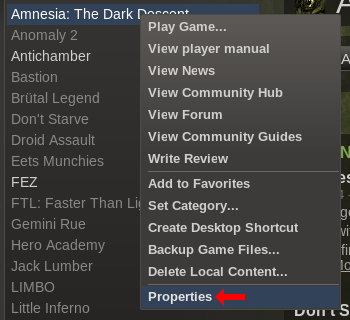
Right-click the game you want to record, and click Properties.
-
Click the Set launch options button, and enter
ssr-glinject %command%. It is highly recommended that you disable the Steam overlay, because in some cases it creates conflicts (resulting in games that crash or refuse to start).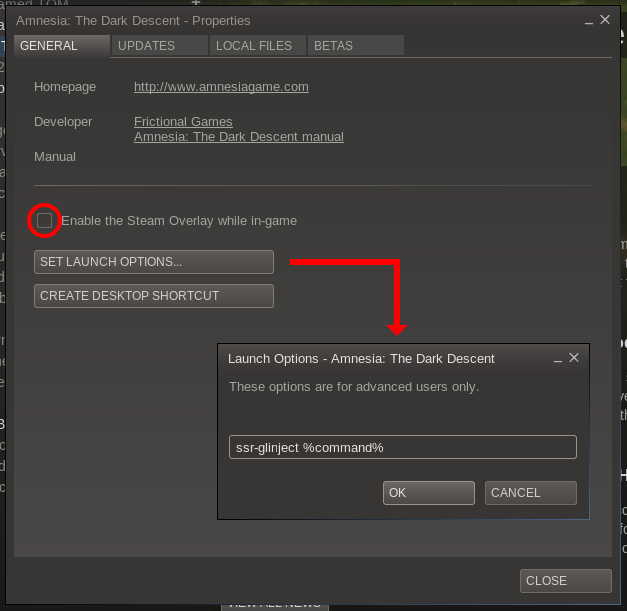
-
Open SimpleScreenRecorder if you hadn't opened it already.
-
Go to the input page and select OpenGL recording. For most games, it's a good idea to check Limit application frame rate (in OpenGL settings).
-
Continue to the output page and choose your favorite file format and codecs.
-
Continue to the recording page. The video won't work yet at this point.
-
Now start the game from Steam. SimpleScreenRecorder should now detect the game so you can start recording.
You can keep the modified Steam launch command even when you are not using SimpleScreenRecorder. The command should not affect gameplay in any way when SimpleScreenRecorder is not active.
Steam for Windows running through WINE
This is actually simpler than the native version of Steam, because the Windows version doesn't use OpenGL for the main Steam window.
- If you have a 64-bit system, make sure that you have the 32-bit SimpleScreenRecorder libraries installed, because Steam games are 32-bit (as far as I know).
- Make sure that Steam is not running (check the system tray icon).
- In SimpleScreenRecorder, go to the input page and select OpenGL recording.
- Click the OpenGL settings button.
- Type
wine <path-to-steam-exe>in the Command textbox. Replace <path-to-steam-exe> with the location of the main Steam executable. Now you should either click Launch now (to start Steam immediately) or check Launch automatically (to start Steam automatically whenever you open the recording page). For most games, it's a good idea to check Limit application frame rate as well. - Continue to the output page and choose your favorite file format and codecs.
- Continue to the recording page. The video won't work yet at this point.
- Now start the game from Steam. SimpleScreenRecorder should now detect the game so you can start recording.
Comments
This page used to have a comment section. It's closed now; what remains are the questions I answered. For questions and bug reports, please use GitHub.
Marcmagus · 27 August 2013, 19:33
This process doesn't work for recording Windows Steam games run under wine, but SimpleScreenRecorder is perfectly capable of recording these as well. It's necessary to launch wine with the OpenGL injection already running. What I've found easiest for me:
Follow the above steps through 8 (you are now on the Recording page)
9. Copy everything from "LD_PRELOAD" up to, but not including, "%command%".
10. At the shell, prefix your usual wine command with what you've just copied. Here's what mine looks like:
(I have a little shell script called wine-steam which sets my WINEPREFIX and changes directory into the steam directory to make life easier. The $ is my bash prompt, of course.)
11. Start the game from Steam. Do not change the launch options like you would for a Linux-native Steam game.
12. Once the game has started, start recording.
Maarten Baert author · 30 August 2013, 23:41
@Marcmagus: That is indeed possible, but if you try that with the Linux version of Steam, it will record both the game and the Steam window itself, because they all use OpenGL. Doesn't the same happen with the WINE version?
Marcmagus · 12 September 2013, 22:20
Not at all; I guess Steam under wine doesn't use OpenGL. I get just the game window. If I try to start recording before I have a game window, I get an error that the application hasn't created an OpenGL window yet.
The Steam overlay is captured by ssr when active, which is pretty much what I'd expect.
If you try to do it the native Steam approach, it doesn't work at all: not sure if that's because Windows handles environment variables differently or because the injection can't be reached from in the middle of wine like that.
The only drawback is that if you stop recording and want to start again you need to completely restart Steam, hence the FR for reusing a session.
Maarten Baert author · 16 September 2013, 15:21
That's good to know, I've added it to the article.
The feature request for 'separate file per segment' is there in the master branch, by the way.
Glog78 · 20 October 2013, 09:02
Hi Marten,
when i try opengl recording with git from today i get the following error:
[SSR-GLInject] Warning: glXSwapBuffers called without existing frame grabber, creating one assuming window == drawable.
[SSR-GLInject] GLFrameGrabber for [0x930aa0-0x6e00013-0x6e00013] created.
[SSR-GLInject] Error: Can't attach to main shared memory (id = 109051905)!
[SSR-GLInject] Library unloaded.
do i miss something ?
Also how to determine the id , which i need to give to the library ?
Maarten Baert author · 20 October 2013, 19:16
It works fine for me ...
The id is shown in the log in SSR when you go to the recording page. Note that it will only work as long as the recording page is being shown. I can't choose the id, it is chosen by the kernel. And I don't want to keep the shared memory around any longer than necessary because it uses a lot of memory.
Vidar · 7 November 2013, 00:46
Absolutely love your program but I wanted to ask something. Is it not possible to simply add a global variable in, for example, /etc/environment so that any OpenGL application gets injected automatically by just running it?
Maarten Baert author · 7 November 2013, 19:47
Yes, you can put the environment variables variables there, but it's a really bad idea. The library would be injected into literally every program. OpenGL recording isn't perfect yet and it will probably make some things crash. Besides, if you try to start an OpenGL program with GLInject loaded and SSR is not running, the program will fail to start.
If you only want to apply this to Steam games, then maybe this is what you're looking for:
https://github.com/MaartenBaert/ssr/issues/54
Botpl · 20 March 2014, 20:08
Hi.
Is there any way to conciliate Bumblebee with SimpleScreenRecorder?
Maarten Baert author · 22 March 2014, 23:53
I think it's possible, but I've never tested it so I'm not sure. The right command would be something like:
Or if you are compiling SSR from source and using the glinject-next branch:
Ubuntuaddicted · 25 March 2014, 12:07
i tried opengl recording of Portal 2 last night and when I got to the last screen of ssr there was no line within the log window. Did opengl recording setup for steam games changes since you wrote your guide?
Maarten Baert author · 25 March 2014, 18:15
Yes, the glinject-next branch uses a different command:
You don't need to change or remove this command anymore once the recording is done, you can just leave it in there, it won't do anything as long as SSR isn't recording.
Ubuntuaddicted · 27 March 2014, 01:31
not sure i follow you, am i suppose to enter
into the ssr command box or that line within the steam game launch options?
UPDATED: i'm really lost. I put ssr-glinject %command% into the steam launch options and Metro: Last Light won't even start now. The thing that's not occurring that used to work was when I would put %command% into the command box within ssr and continue to the recording tab it would actually have a command I could copy and paste into the steam launch options but now nothing shows up in the log box for ssr. Another issue may be that Metro Last Light is NOT an opengl game.
Maarten Baert author · 29 March 2014, 15:25
Maybe try starting with something simpler first, to make sure that OpenGL recording actually works. Try installing 'mesa-utils' and run:
You should get three colored gears and SSR should be able to record it. If this doesn't work, it means that SSR didn't compile or install properly.
In order to make recording for Steam games work, you may have to disable the Steam overlay (the checkbox right above the launch options button).
If that still doesn't fix the crash, you should also disable the steam runtime. I don't think this will be needed on Ubuntu though. But this is how you do it: Quit Steam, then start it from a terminal with this command:
This will only work if you have all the required dependencies installed which is probably not the case initially. I'm still trying to find a solution for this. The problem appears to be that my GLInject library is pulling in some system libraries that interfere with the Steam runtime.
Dubslow · 7 April 2014, 02:13
Okay, there's something going wrong here.
Firstly, I want to double check/confirm that the former glinject-branch was merged into master? I ask for two reasons: 1) github has master, wayland, backport, and libdrm branches, but no glinject-next branch, and 2) despite pulling only from master, the version I installed from my local git clone also does not output any SHM stuff into the recording page log when I attempt to do OpenGL recording.
With that evidence, it seems to me that glinject-next was merged into master, thus rendering the content on this page largely out of date.
Now, I've skimmed the last few weeks of comments here, and while I admit to some confusion about how to operate OpenGL injection, I have nonetheless attempted to get it working, only to run into abject failure.
I tried running "ssr-glinject glxgears" both with and without SSR already open (not recording, however); in all cases, regardless of SSR or its settings w.r.t. OpenGL, the command fails with the following output:
(Additionally, whatever fragment of OpenGL attempted to run completely ruined that portion of my monitor, the white fragment in the top left; however since I've had that issue with certain other things as well, I believe this may be a Cinnamon issue than an OpenGL one.)
The same thing happened even with either of "ssrglinject %command%" or "%command%" in the OpenGL settings pop up, then forwarded to the recording page. Attempting to begin recording before running the command failed in the obvious way (couldn't get frame size of the un-run application).
SSR certainly did compile and install correctly, because this is the exact installation I've been using for all my other things, including livestreaming (without OpenGL of course, as this was my first foray into the area).
I'd be happy to help "research" this further in whatever way you need.
Maarten Baert author · 7 April 2014, 23:15
Correct.
The documentation always refers to the latest stable version. glinject-next has been merged but not released yet, so I can't update this page yet without confusing even more users.
It looks like you are loading an old version of the glinject library. You either didn't install it properly, or there is an older version of the library still lying around from a previous SSR install (e.g. from a package that installed to a different location).
The new version of glinject will print something like this:
More likely a Steam issue, I believe. It's not the first time I've seen the Steam window failing to update. Or it could be a combination of the two.
Dubslow · 8 April 2014, 01:31
Huh. I don't know how that could have happened, seeing as I've only installed from my own compilation, and that with the provided script.
At any rate, I did
and reinstalled, and that seemed to fix at least this basic issue.
Well the picture I gave you was the result of running `ssr-glinject glxgears` -- Steam was not involved (but I have had the same issue with Steam windows from time to time). This is what makes me think it's an issue with Cinnamon.
At any rate, I still have no idea how to get the glinject working. After properly installing libssr-glinject, I tried "ssr-glinject glxgears" with an SSR instance open and set to OpenGL recording, but the command spat this:
I tried ignoring terminal by setting the OpenGL command (in the SSR popup) to "glxgears", checking "Launch automatically", and going to the recording page, whence the glxgears window appeared and started turning just fine, however attempting to start recording. However, in that case, the SSR log window came back with this:
This appeared while I was watching the gears autolaunched by SSR.
At this point I'm inclined to attribute the issues to my own ignorance, so I happily await a new release so this page can be updated. :-)
Maarten Baert author · 8 April 2014, 02:56
This makes no sense, glxgears is 64-bit and ld.so can't load libssr-glinject.so, so either libssr-glinject.so can't be found or only the 32-bit version can be found. Did you use simple-build-and-install, or did you use some other command to install the library?
Try to delete the build and build32 folders, and run ./simple-build-and-install again. That should fix it if it's simply a problem with the build system. If that fails, I would like to see the output of
find /usr -name libssr-glinject.so | xargs file(locate can be out of date unless you runsudo updatedbfirst).Dubslow · 8 April 2014, 03:16
The simple-build-and-install put the libs in both /usr/lib32 and /usr/lib64 (and I
locateed that aftersudo updatedb.To be extra certain, here's a terminal session:
Maarten Baert author · 8 April 2014, 03:27
What's the output of
cat /etc/ld.so.conf.d/*? Is /usr/lib64 in there?Dubslow · 8 April 2014, 03:34
Huh. How strange.
I guess modern Debian-family distros are well and truly past the use of lib32 and lib64.
Edit: lib64 appears largely unused.
Maarten Baert author · 8 April 2014, 04:00
Usually lib64 either doesn't exist or it is symlinked to the correct directory. You can easily change the simple-build-and-install script so it installs it in the right directory. I will try to update the script and use a more robust detection system.
Maarten Baert author · 8 April 2014, 04:22
According to this, /usr/lib64 should be a symlink to /usr/lib. So the right solution would be to move your files from /usr/lib64 to /usr/lib, delete /usr/lib64 and then symlink it to /usr/lib.
I can't easily detect the right solution in situations like this, because some distributions do weird things (on Fedora, /usr/lib is 32-bit and /usr/lib64 is 64-bit).
Dubslow · 8 April 2014, 04:32
On Debian systems, the "proper" thing to do would be to put them in either of /usr/lib/i386-linux-gnu or /usr/lib/x86-64-linux-gnu as apporpriate; perhaps you could check "if those exist (i.e. if this is a debian derived distro) then install there, else /usr/lib{32, 64}.
Maarten Baert author · 8 April 2014, 05:09
But clearly some of your packages didn't do that, otherwise the lib64 directory wouldn't even exist :). Anyway, I will try to detect those instead, but I'm also changing something else at the moment so this will take some time. Can you change the paths yourself for now?
Edit: also, please realize that by doing this, I will probably create more problems for other Debian and Ubuntu users at some point in the future because they will end up with two versions of the library in different locations, so now I have to add additional code to handle that case too ...
Dubslow · 8 April 2014, 19:04
The only things in my /usr/lib64 are "libssr-glinject.so", "libssr-glinject.la", and "kde4/ kcm_adobe_flash_player.so". Considering that there are
more than 3000 packages on this system and there is only one manually-installed adobe flash lib (for which there hasn't been a new version in three years+) in /usr/lib64, I'd say it's pretty unused by all packages. :P
(Also note that even if it didn't exist, the make install runs a
mkdir -p /usr/lib64, so the directory not existing wouldn't have stopped it anyways.)I think that's well-worth it to do things the "proper" way. Average users won't know the difference, and "power users" would consider it very strange for something to be in /usr/lib64.
Edit: Just saw the commits -- thanks for all the work you continue to do :D
Maarten Baert author · 8 April 2014, 20:53
No, because simple-build-and-install only sets /usr/lib64 as LIBDIR if it already exists. So if you run simple-build-and-install without /usr/lib64, it won't be created.
I'm already doing that in the last version.
Sgdragonslayer · 7 July 2014, 23:12
Im trying to record TF2 (Team Fortress 2) right? But everytime I do it says that the OpenGL hasnt opened yet and when it does record, I get a messege saying that It couldnt find audio samples and inserts silence. How do I fix this?
Maarten Baert author · 9 July 2014, 00:40
Those are two unrelated problems. For the first problem, try launching steam from a terminal so you can see the error messages. They will probably tell you what's wrong. You might want to read this, it could be the problem you're seeing.
The second problem depends on the audio backend and source, which ones are you using?
Vertigo · 24 July 2014, 16:45
Hey Baert I love your program and salute for you :D
but i have a little problem with the recording from Steam. In general the program works good to example the standalone program FasterThanLight, works fine! If i record DayOfDefeat on Steam, the program record nothing.
Here is a screenshot before i click record:
http://postimg.org/image/n9xl6r5yn
this screenshot is taken after i click the record:
http://postimg.org/image/mgj8kuj1b
you see file-size is null and the input resultion ist null but in the log file the stream ist created.
I use Debian 7.6 wheezy on a 32-bit machine, I use a native Steamversion for Linux and your program is compile from the github with the ./simple-build-and-install script.
Here is the log.
Maarten Baert author · 30 July 2014, 13:53
@Vertigo: I suspect the game is hogging your microphone, preventing SSR from opening it. Can you try to record the game again, but disable audio in SSR?
Are you using PulseAudio?
Vertigo · 2 August 2014, 14:35
Hey Maarten,
I install Pulseaudio after your answer and disable the Audio in SSR. After this it try again to Start Steam with Halflife 1 game.
simplescreenrecorder 2> ssrerror.log >ssr.logThis is my ssrerror.log:
and my this is my
Best greetz
Vertigo
Maarten Baert author · 5 August 2014, 00:50
@Vertigo: You did not disable audio, I can see that the audio codec is still being loaded. But I can also see a lot of error messages for libvorbis and libtheora which shouldn't be there. I suspect there's something wrong with your libavcodec build. Are you using the official packages or something else?
EDIT: Just to be sure, you are setting the channel name to your username, right? If not, you have to use the --channel option with ssr-glinject.
Thekiwi5000 · 2 January 2015, 18:39
There's something wrong with OGl recording.
While using OpenGL recording to capture Team Fortress 2, i get barely 7FPS recorded and 11 in-game.
If i record the same but tell SSR to record entire Screen, i get 45 FPS recorded and much more in-game.
Some other data:
Container: MP4, Codec H.264, Constant rate factor 23, preset ultrafast. Audio codec is Vorbis, 256kbps.
Frame-dropping enabled (sorry, i have polish translation of SSR so the names won't be exact).
Record FPS limit is set to 60.
I think it may be the fact that i'm using fglrx and AMD's drivers for my Radeon R9 280 GPU (i won't change them because it's extremely hard to get it working at all, and running OGL is much harder).
I think there should be some kind of knowledge base for this software, containing answersr for, for ex. "What PC should i have to record XXX with SSR?" or "Will i get VAC-banned on XXX for using glinject?"
Anyways. That's the best recorder i've ever seen. Keep up the good work!
Maarten Baert author · 3 January 2015, 23:12
I've seen some extreme cases where OpenGL recording would halve the frame rate, but a drop from 45 FPS to 7 FPS is not normal. I suspect this is a driver issue. Do you have this problem with all games, or just Team Fortress 2?
Yeah, that would be useful. I've been thinking about setting up a wiki for it, but I haven't gotten to it yet.
Stony · 14 January 2015, 19:30
Hey Maarten,
first of all THANKS for this awesome tool you created. I used to play around with GLC just to record everything and it was a PITA to accomplish it. Now it is so easy and I enjoy it very much.
It used to work here under arch linuX - however recently i can't get it running again.
CS:GO refuses to start with the following message:
Because of the symbol lookup error it does not start. The preload errors are even present when I remove the ssr-glinject command and play normaly. Everything works.
Only when I try to add the recording option to the start-command it refuses.
Do you have any hin for me?
Maarten Baert author · 17 January 2015, 18:31
It looks like the build system is linking libssr-glinject.so against libavcodec even though I never told it to do that. I have no idea why. I'm trying to fix it now.
Edit: Problem found and fixed. You should get an update soon.
Sergmx · 24 March 2015, 22:21
Hi !
( sorry bad my english )
I os Fedora 21
I startt steam game i see messages:
Please help me.
Thanks.
Maarten Baert author · 28 March 2015, 00:49
@Sergmx: The Steam runtime is interfering with SSR. This can happen on distributions like Fedora and Arch where the libraries are newer than the ones that come with Steam.
There are two possible solutions:
STEAM_RUNTIME=0 steam. This will only work if you manually install all the 32-bit libraries that Steam needs, which is not easy./home/mx/.local/share/Steam/ubuntu12_32/steam-runtime/i386/usr/lib/). Make sure that the SSR version matches. This is easier, but it has to be done again whenever Steam or SSR is updated.Al3x · 3 September 2015, 15:52
Hi, I'm sorry to ask a possibly dumb question but I could not get a concrete answer anywhere. Is the risk of getting VAC banned on steam still applying to the recent version of SSR? (0.3.3) I'm sorry if it's been asked before but I really couldn't find an accurate answer. Just speculations. Thank you very much nd the program works well in 'record entire screen option'. OS: Ubuntu 14.04.3 LTS
Maarten Baert author · 5 September 2015, 00:42
It all depends on how much you trust VAC to have no false positives. Valve has responded that they won't ban you as long as you don't cheat. The real risk is that if at some point someone creates a cheating tool using a mechanism similar to my GLInject code, VAC might accidentally confuse SSR with that tool. So far that has not happened, but I can't give you any guarantees. That's why the warning is there.
Jacob Mclaurin 02 · 29 September 2015, 18:34
when i write the launch option it makes the game not launch it opens for just a second then closes after please help me
Maarten Baert author · 30 September 2015, 21:56
Make sure that the Steam overlay is disabled. If that doesn't fix it, and you are using a distribution that isn't Ubuntu 12.04, then try this:
https://github.com/MaartenBaert/ssr/issues/214
Basically, install the Ubuntu 12.04 SSR libraries in the Steam runtime directories.
Djcj · 29 December 2018, 04:32
Not true. Most games are, but some are 64 bit or offer binaries for both architectures.
Maarten Baert author · 11 January 2019, 00:55
All right, I will update it.
Linuxoed · 24 February 2020, 11:07
Well, if I understood correctly, I won’t get a VAC ban if I follow this instruction. I want to record CS: GO.
P.S. Sorry for my broken English, this is not a oh native language.
Maarten Baert author · 27 February 2020, 11:56
I cannot guarantee this, but it is unlikely that you will have any issues. Back in 2017 there was one SSR user that got VAC banned, but he was unbanned again fairly quickly once he contacted Valve:
https://github.com/ValveSoftware/csgo-osx-linux/issues/1454