Joints
Last updated 27 March 2011
Joint types
ExtremePhysics supports multiple types of joints. The type of joint defines how the movement of the bodies is constrained.
Hinge joints
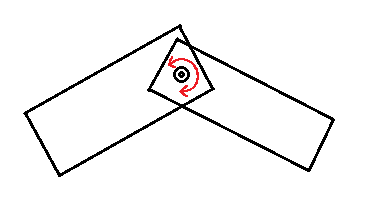
Hinge joints connect two anchor points, like a hinge. The bodies can still rotate.
Hinge joints can be created with ep_hingejoint_create.
Distance joints
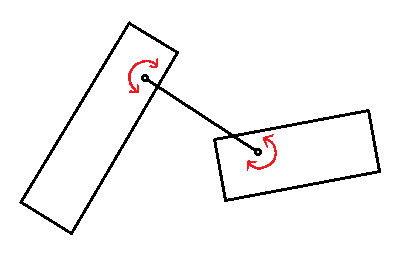
Distance joints constrain the distance between two anchor points. Actually this type of joint doesn't do anything unless you're using springs or limits. Distance joints that don't use springs or limits take virtually no processing time, so don't worry about performance.
Distance joints can be created with ep_distancejoint_create.
Rail joints
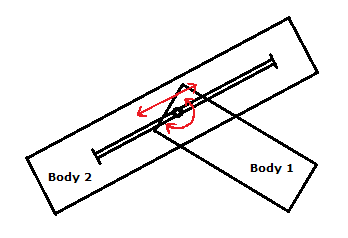
Rail joints connect the anchor point of the first body to a rail on the second body. The bodies can still rotate, and translate along the rail.
Rail joints can be created with ep_railjoint_create.
Slider joints
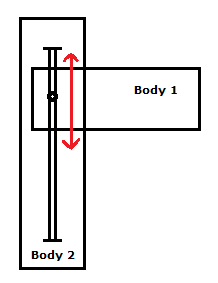
Slider joints connect the anchor point of the first body to a rail on the second body. Slider joints are very similar to rail joints, the difference is that slider joints will also block the relative rotation of the bodies. The bodies can only slide along the rail, they can't rotate relative to each other.
Slider joints can be created with ep_sliderjoint_create.
Local coordinates
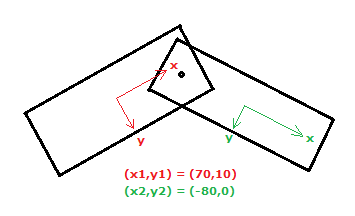
Joints use local coordinates to define the position of the anchor points. The following illustration shows how local coordinates work:
Motors
Motors try to change the velocity of the bodies connected by the joint. The motor will try to make the bodies rotate or translate with a fixed velocity.
Hint
Depending on the weight of the bodies, you might have to set the motor force to a very high value (e.g. 100000) to make it work. You can avoid this by using a lower density for your shapes (but it's not required).
Joint limits
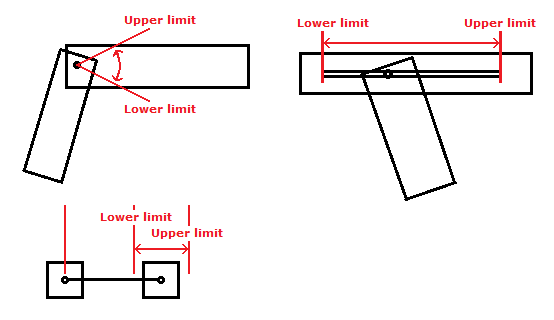
Joint limits are used to add additional constraints to a joint. Joints can have a lower and an upper limit. Both limits can also be set to the same value to simply block all movement.
Springs
Springs are very similar to limits, but instead of blocking the bodies springs will apply a force to push the bodies back, just like real springs. Joints can have a lower and an upper spring. Springs use very little processing time (compared to motors and limits).
Special usages
Joints can also be used to simulate some special things you might not think about immediately.
Joint friction
You can use joint motors to simulate friction. Just set the motor velocity to zero and set the motor force to a relatively low value. The motor will try to stop the body whenever it moves, but since the motor force is too low it will yield easily.
Servo
A servo is a mechanism similar to a motor, but instead of controlling the velocity of the motor it controls the position directly. You can do something similar in ExtremePhysics with joint limits and limit velocities. This example uses a hinge joint, but the same method can be used with any type of joint.
// create event
servo_angle = degtorad(30);
servo_maxvelocity = degtorad(3);
servo_maxtorque = 100000;

// step event
var current_angle, velocity;
current_angle = ep_hingejoint_get_rotation(global.world, joint);
velocity = max(-servo_maxvelocity, min(servo_maxvelocity, servo_angle-current_angle));
ep_hingejoint_set_lower_limit(global.world, joint, servo_maxtorque, current_angle+velocity, 0, velocity);
ep_hingejoint_set_upper_limit(global.world, joint, servo_maxtorque, current_angle+velocity, 0, velocity);

// changing the position of the servo
servo_angle = degtorad(60);
The limit velocity is needed because ExtremePhysics uses the velocity of the object to simulate collisions with other objects. Without the correct limit velocity the collisions wouldn't be realistic at all.
You can also use the joint motor instead of the joint limits, but it's not recommended. Motors can only control the velocity, not the position. It works, but the result isn't as good.
Comments
This page used to have a comment section. It's closed now; what remains are the questions I answered.
Luke · 17 April 2011, 00:20
what kind of things do you mean by special usage?
Dreadofmondays · 27 June 2011, 16:21
I love this engine, it's been really useful so far. I was hoping I wouldn't have to do this, but I can't think of another way, so I'm going to make a request to you, Mr Maarten. The request is: Can you please add a way to anchor objects together? That is, make one move as if it was stuck to the other, rotation and all. This is important if the objects are separated from each other, as in my case. I've tried to fake it with hinge/slider joints and limits, but it doesn't work if the objects aren't on top of each other.
If you have a way to do this using what's already here, please tell me! :D Otherwise, you may have to implement it. ^_^
Thanks for reading my longer-than-average comment!
Maarten Baert author · 2 August 2011, 02:31
I mean joint friction and servos :). Those are actually 'sub-headers', but the font isn't very clear (I think I will add numbers to the headers when my new BBcode parser is finished).
I could add 'weld joints', but it would essentially be the same as a hinge joint with limits. It just can't get much better. It might be a bit faster, but it's still not perfect (unlike using just one body with multiple shapes). If hinge joints with limits don't work properly for some reason, that's caused by either a bug, or bad/incorrect settings.
Could you give me some more information about how you create these hinge joints, and also the world settings you're using?
PS: You don't have to copy your comments to get them noticed, I use the 'Recent comments' button to find new comments :).
Solarboy · 27 December 2011, 10:24
Hello again! I have a question about hinge joints.
How would one get the x and y of a hingejoints anchor points? Similar to how there is ep_body_get_x and ep_body_get_y for bodies, is there someway to do the equivalent for hingejoints? I haven't seen anything like this in the reference section, nor can I think of another way to obtain this information without causing other problems.
Thanks for your time, and keep up the good work!
Maarten Baert author · 28 December 2011, 21:34
Assuming you still know the local coordinates of the anchor points, you can use ep_body_coord_world_to_local_x/_y on one of the bodies.
Elfdud7 · 24 April 2012, 02:44
Is there any way to make an elastic rope with distance joints? I Seem to have gotten it pretty well; here's the generation code:
n=1
repeat (20)
{
me[n] = ep_body_create_dynamic(global.world,false);
shape1[n] = ep_shape_create_circle(global.world,me[n],1,0,0,0,1)
ep_shape_set_collision(global.world,me[n],shape1[n],collide1a,collide1b,0);
ep_shape_set_material(global.world,me[n],shape1[n],0.5,0.1,0,0);
ep_body_calculate_mass(global.world,me[n]);
ep_body_set_position(global.world,me[n],x,y,degtorad(image_angle));
ep_body_set_damping(global.world,me[n],.05,.1);
ep_body_set_gravity(global.world,me[n],0,0)
line[n]=ep_distancejoint_create(global.world,me[n],me[n-1],0,0,0,0)
ep_distancejoint_set_upper_limit(global.world,line[n],1,dis/20,1,0)
ep_distancejoint_set_upper_spring(global.world,line[n],2,1,.1)
n+=1
}
but it stretches beyond its limits.
Maarten Baert author · 26 April 2012, 00:25
Increase the maximum limit force, e.g.:
Elfdud7 · 12 May 2012, 10:48
Hey, Thanks! It didn't work perfectly, but the joints effected by what you suggested seemed to work excelently. I gave up, replaced with a new system.
Is there any way to connect two equally sized blocks with a linear "spring" which allows linear movement in one direction, but without rotation?
Maarten Baert author · 3 June 2012, 21:02
Do you mean a slider joint with a spring? Yes, that's possible (ep_sliderjoint_set_lower_spring/ep_sliderjoint_set_upper_spring).
Nickgerrets · 29 December 2012, 13:22
Hello, I want to make a game where you could make your own car (from the side), at the start of a lvl you have to place the objects to built your own car or rocket or something, some of them have force and some of the objects dont. I have read the tuts but how do you make the objects connect to each other. The game is like the app "Bad Piggies".
Maarten Baert author · 29 December 2012, 15:22
If you want to connect two things together with a hinge (e.g. the wheels), you should use a hinge joint. If you don't want the objects to rotate relative to each other, you should use a single body with multiple shapes. Alternatively you can use a hinge joint with both joint limits set to zero, but the result won't be as good.
Nickgerrets · 29 December 2012, 18:44
Is there a way to connect 2 body's when they collide, i dont want them to move, but break/release each other when they collide to hard with a wall or are stretched (to much weight on top of it) to much?
Maarten Baert author · 29 December 2012, 18:56
You can detect high forces with ep_contact_get_point1_normalforce/ep_contact_get_point2_normalforce. Read the collision detection tutorial to find out how to detect collisions and use these functions.
Breaking a body simply means destroying the body and replacing it with multiple smaller bodies.
Use collision detection to find contacts, and then use the contact functions to find the collision point. I already explained how you can connect bodies - do that. If you use the second method (hinge joint with both limits at 0), you can monitor the hinge joint forces and limit forces and destroy the joint when they become too high.
Nickgerrets · 30 December 2012, 15:22
I made hingejoints (with limits to zero) to connect blocks to each other, I now have a car with a small force in the back (a small fan), the wheels arent powerd, but when it bouces to much the blocks and all parts go crazy and fly appart. How do i solve this?
Maarten Baert author · 30 December 2012, 16:06
Hinge joints with limits set to zero are never as stable as actually using a single body with multiple shapes - you should really do that instead if it is at all possible. I've seen issues like this before, but I can't really solve them because it isn't actually a bug as far as I know (it's a consequence of the approximations that I have to use to make the simulation fast enough).
If you haven't done so already, put all connected parts of the car in the same group so they don't generate collisions.
Other things that can improve stability:
- In ep_world_set_settings, set baumgarte_factor to zero if it wasn't already.
- Decrease mass_bias or set it to zero. This usually helps a lot.
- Make sure that velocity_iterations is at least 20 - higher values may be even better.
- Give all bodies a maximum rotational velocity that makes sense for your game (use ep_body_set_max_velocity, don't forget to use radians).
- Use substeps - run ep_world_update_contacts and ep_world_simulate_step multiple times each step (and decrease timestep to compensate for this).
If none of this works, could you post your GMK (or send me an e-mail)?
Nikincz · 8 August 2014, 11:48
Hello, I am making space game based on blocks. You can build rocket of blocks and vice versa. Anyway, I am making these blocks as individual bodies and I have to connect them together, because it have to be little bit breakable and some parts can be throwed off. So what joint and settings can you recommend me? Also, I would like to make my game commerical in future. Is that possible with this dll?
Thank you, NikinCZ
Maarten Baert author · 9 August 2014, 22:57
A hinge joint with two limits both set to the same value. You can adjust the maximum force of the hinge joints and the maximum torque of the limits. You can also check the current force and torque each step and make the joint break if it reaches the limit (add some safety margin for rounding errors though - if your maximum force is 1000, the joint should break when the force is greater than 999.9).
That's fine as long as you don't modify the DLL itself. If you do modify it, you have to make the modified DLL open-source (this license is called the GNU Lesser General Public License or LGPL).
Nikincz · 10 August 2014, 09:59
It still don't work as I need. When block rotate, distance between blocks is randomly changed...
This is joint code, where connected bodies are 16x16 blocks. Blocks are spawned with no space between them.
Maarten Baert author · 10 August 2014, 23:57
Try enabling debug drawing. The bodies and/or joints probably aren't where you think they are.
Nikincz · 12 August 2014, 11:21
I have enabled it already :/
I really don't know what is the problem... This is my project.
Maarten Baert author · 12 August 2014, 18:53
I just realized that the reference is a bit confusing.
Setting it to zero disables the entire limit, not just the maximum force (there is no other function to disable limits). You have to enter a nonzero value.
Nikincz · 15 August 2014, 12:23
Wow! It works now! :D Anyway, parts very often randomly fly away in random directions. How to solve this?
Maarten Baert author · 15 August 2014, 13:30
Use debug drawing to figure out where the forces are coming from. Generally it means that you have too many constraints per body, i.e. your bodies are 'overconstrained'. Remove constraints until you have no more constraints than strictly necessary.
For example, if you have three parts (A, B and C), then you could connect A to B and B to C, but then you shouldn't connect A to C anymore because it is already connected indirectly.
Try to connect the heaviest parts directly to each other, and then connect lighter parts to heavier parts.
You should also make sure that the connections are actually made at the point where the two parts meet, and not somewhere completely outside one of the parts.
It also helps to put parts of the same object in a collision group so the parts don't have collisions with each other anymore. These collisions aren't necessary since the parts are already connected anyway.